







3. UPS Access Points voor Magento 2
Schakel UPS Access Points in Magento 2 in zodat klanten afhaalpunten kunnen kiezen tijdens het afrekenen.
Stapsgewijze handleiding
Vereisten
PHP Version Requirement: PHP 7.3 or higher. Magento Version Requirement: Version 2.3.4, 2.3.7 or newer (Tested up to version 2.4.6p3, 2.4.6p4, 2.4.7). Magento 2 Core Plugin must be installed. Dependencies: firebase/php-jwt, swaggerlib/iws-isa=dev-main.
→ https://ups.dashboardlink.com/Handmatige Installatie
Download the ZIP file of the UPS Access Point addon. Extract the contents into your Magento root directory under "app/code". Follow the folder structure: app/code/UPS/AP. Install Core module: composer require ups/dashboard. Install firebase/php-jwt: composer require firebase/php-jwt. Run: composer require swaggerlib/iws-isa=dev-main. Execute: php bin/magento setup:upgrade, setup:di:compile, setup:static-content:deploy -f, cache:flush.
→ https://github.com/firebase/php-jwt
Download Plugin
Donwload the Plugin you can use for upload in Magento
→ https://link.ecommerce.help/ups-plugins-magento2/access-pointsConfigureer UPS Access Points
Navigate to: Admin > Store > Configuration > Magento UPS > Start Here. Choose the appropriate store view from the store scope.
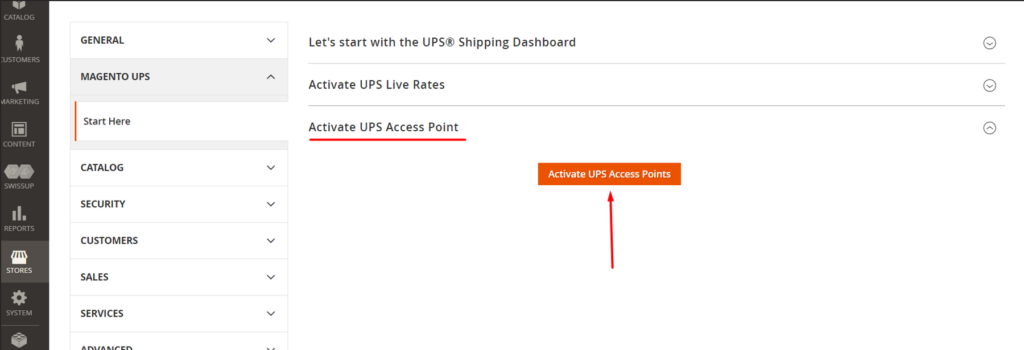
Stel Winkeladres in
Go to: Admin > System > Settings > Configuration > General > Store Information. Ensure the store address is accurately set up.

Configureer Verzendmethoden
Which shipping methods for UPS Access Points to be displayed is configurable in your eCommerce Shipping Dashboard on ups.dashboardlink.com. Navigate to Stores and click on "Configure" for the UPS Access Points connection. Here you can take certain configurations and enable the Services you would like to offer in your Checkout.
→ https://ups.dashboardlink.com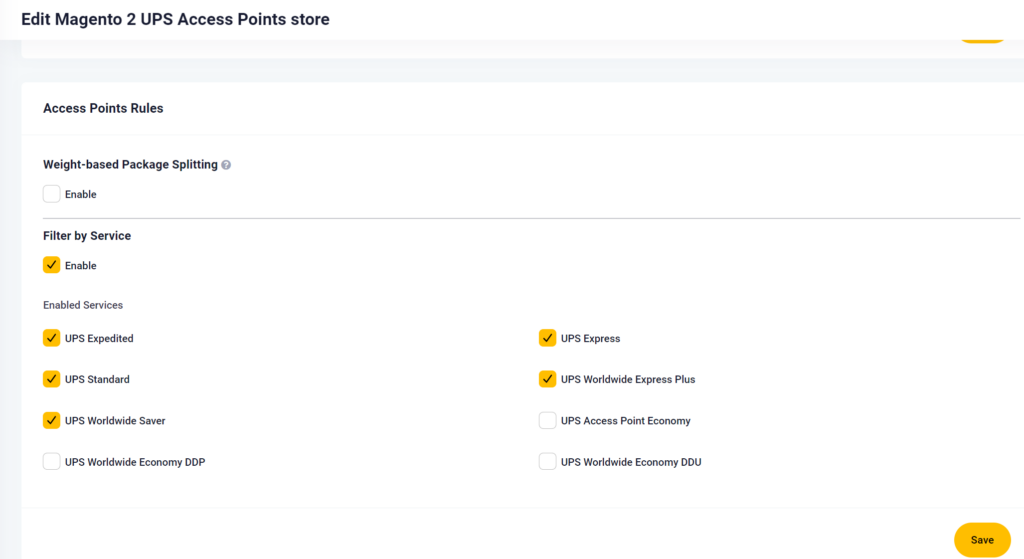
Afrekenen: Kies Locaties
By default the closest location to the entered customer shipping address is displayed when a UPS Access Point option is chosen. The buyer has to confirm this location. If they want to choose another location, they click on the "Choose Location" button.
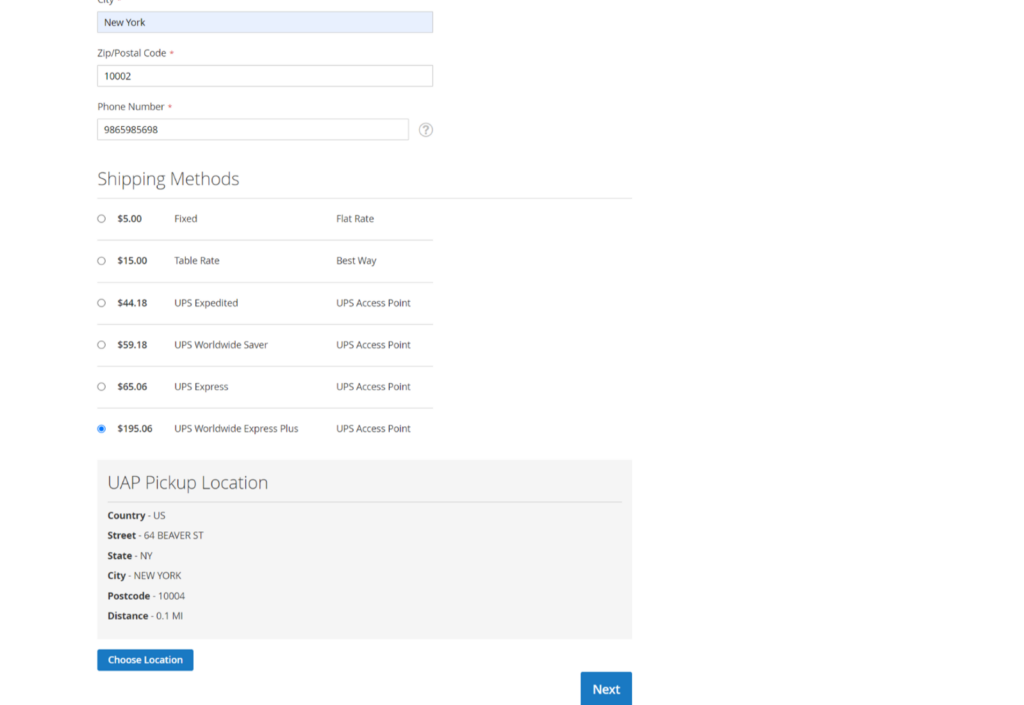
Selecteer Alternatief Access Point
Clicking on the "Choose Location" button will redirect the customer to a UPS Access Point page. On this page the customer can select another UPS Access Points location. As soon as this has been chosen, the system redirects the customer to the Checkout and replaces the address.
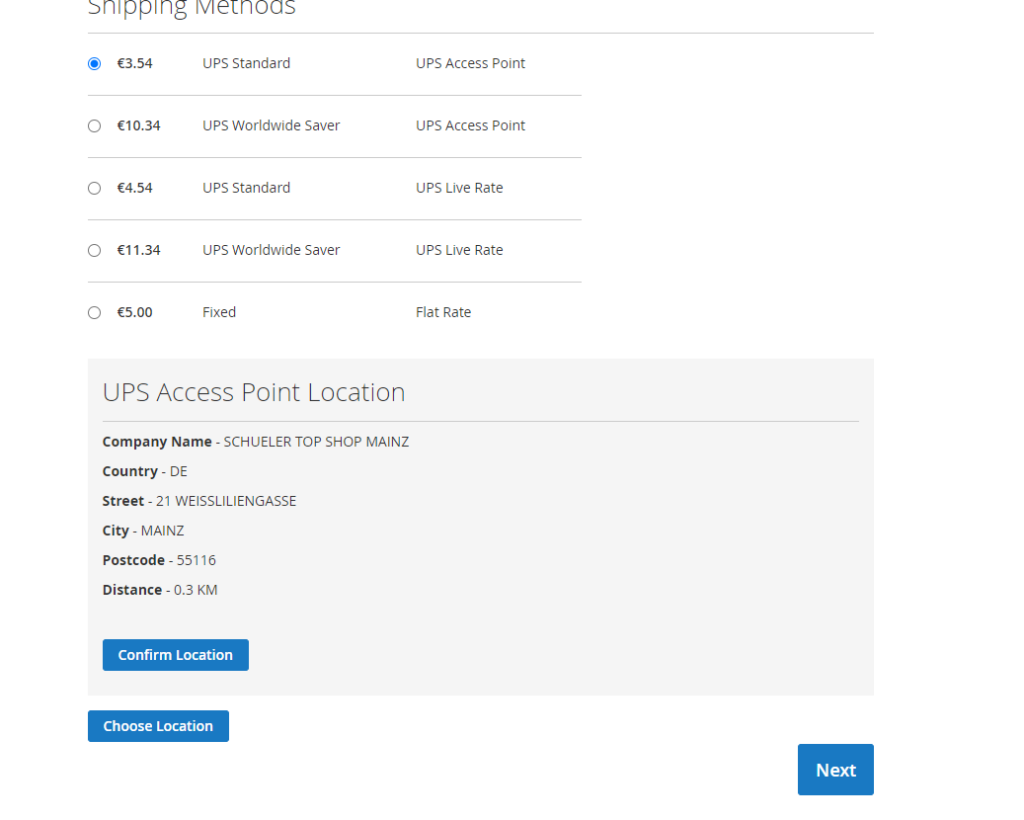
Deïnstallatie (indien nodig)
Manual: Navigate to the Magento root directory. Delete the "UPS/AP" directory from "app/code". Command Line: Execute bin/magento module:disable UPS_AP, then bin/magento module:uninstall UPS_AP. Then run: php bin/magento setup:upgrade, setup:di:compile, setup:static-content:deploy -f, cache:flush.